For online fitness coaches
Add Clients.
Not Hours.
Programs, workouts, check-ins and client chat in one place. Your AI is built from one conversation about how you coach, no content library required, and can answer or draft routine client questions between sessions. You set how much it handles.
Thursday, while you were off
- 9:00 amChris logged his morning session.
- 6:12 pmMaya logged her squat day.
- 6:40 pmJordan swapped the leg press for today. You were notified.
- 8:55 pmRiley asked what today’s session is. Your AI answered, based on how you coach.Fully autonomous
- 9:10 pmSam has week 4 drafted and ready for you.
- Jordan asked to swap squats at a hotel gym tomorrow.Decide
- Alex has a reply draft waiting.Open
- Sam’s week 4 is ready for your review.Review
Why coaches hit a ceiling

Never ending
Constant questions, form checks and swap requests, from every client, at all hours.
Stitched together
A scheduling app, a program spreadsheet, a logging app and a texting thread for check-ins. The work is split across all of them.
Every program by hand
Every new client is another program to write from scratch, week after week.
How it works
From one conversation to your first client.
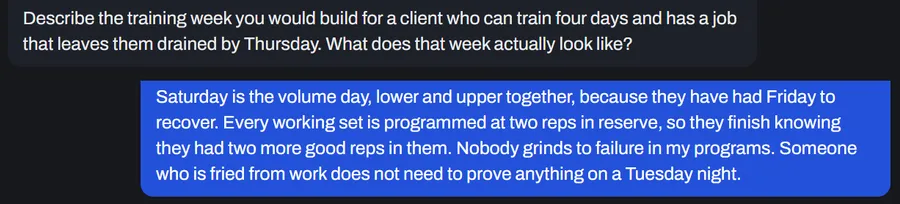
From Leah’s setup conversation: her rule that every working set stops two reps short of failure.
01
Talk it through once
A guided conversation at setup about how you program, progress people and talk to clients. Your AI works from what you explain there. No content library required.
Maya accepted your invite
Intake done: goals, experience, equipment, days
Approve Maya to start
Maya joins and completes intake. Leah approves her.
02
Bring clients in
Invite them, have them apply, or let them buy one of your plans on your page. Wolvec handles sign-up and intake. You just review it.
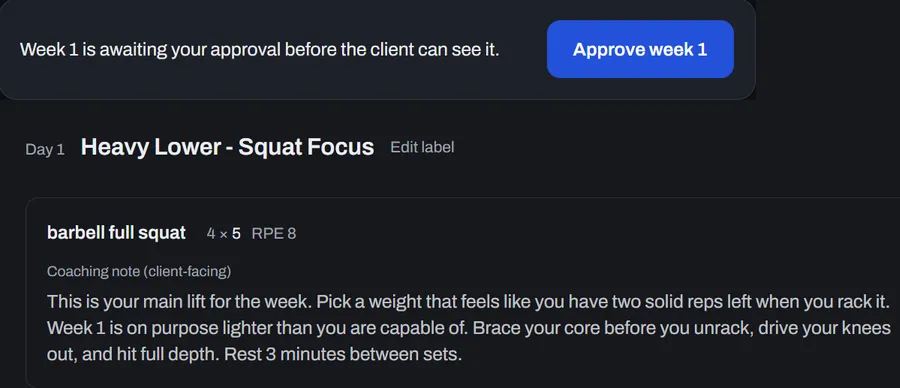
Her rule, built into Maya’s heavy squat day, waiting for Leah’s approval.
03
A program built for each client
Your AI drafts it based on how you coach and what each client tells you: their goals, experience, the equipment they have and the days they can train. You approve each week before they see it.
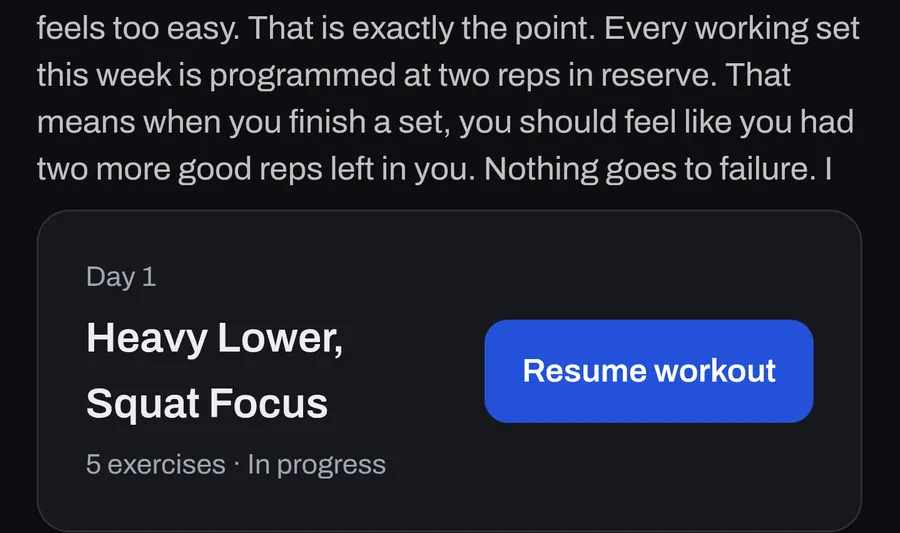
Before her first squat day, Maya reads the rule in Leah’s words.
04
Your coaching goes with them
Your notes go with the program and into each workout, so clients train with your cues in front of them. Routine questions get an answer based on how you coach, sent automatically or drafted for you to approve.
Real Wolvec screens from an example coach account, cropped. Step 02 is an illustration.
Already writing programs? Bring them.
Upload the programs you already run as spreadsheets, Word (.docx) documents, text-based PDFs or plain text files. Wolvec turns them into templates matched to the exercise catalog, so you are not retyping years of programming. Check each line, then assign.
Template: Strength Block A 2 lines to confirm
Back squat 4 × 5Unconfirmed
Romanian deadlift 3 × 8Unconfirmed
Walking lunge 3 × 10Confirmed
Your control
You set how much your AI handles.
Client chat runs at the level you pick: Fully autonomous, Drafted for review, or All off. Drafted for review is the default. Safety controls and location based restrictions can require Coach review even when you choose Fully autonomous. Program changes never apply without your approval. Change it any time.
Fully autonomous
Your AI answers routine questions based on how you coach. You can read every conversation, reply directly at any time, or pause your AI for that client.
Drafted for review (default)
Your AI drafts routine replies based on how you coach. You review them before they send.
All off
Client messages come to you. Your AI does not draft or send replies.
Your AI is shaped by the coaching material you give Wolvec, including your interview, coaching profile and sample messages. For individual clients, it can also use notes you write about how you want that client coached, subject to Wolvec’s client controls. Wolvec keeps each coach’s materials separate and does not use one coach’s materials to build or personalize another coach’s AI. Every coach’s AI follows Wolvec’s shared rules for safety, scope, nutrition and style, and starts from the same licensed exercise catalog.
The platform
One place to run your coaching.
Programs, workout logging, progress, check-ins, nutrition and client chat, with your AI built in, all ready before your first client shows up.
01
Build the training
Programs drafted by your AI, approved by you
Your AI drafts each program week based on how you coach and the client's intake. Edit exercises, sets, reps or structure, then approve the week before the client sees it. Or build your own workouts from the exercise library and reuse them as templates.
Nearly 1,400 exercises, demos included
The catalog comes with animated demos and step-by-step instructions, so you are not filming or writing them up yourself. Add your own exercises, with your own video link, when something is missing.
Supersets, circuits, AMRAP and timed work
The AI drafts the week. You layer in supersets, circuits, AMRAP and timed work wherever you'd program them.
Reusable program templates
Build a program once, use it again. Stop starting from a blank page for every client.
02
Run the week
Weekly check-ins and workout ratings
Clients send a weekly check-in, so you see how their week went without chasing anyone. They can also rate how hard each workout felt.
Nutrition and macro logging
Clients log meals and track macros without leaving the platform. One more piece of the relationship that doesn’t need a separate app.
03
Stay on top of it
Know who needs you
Your home screen puts what needs you in one place: requests waiting on your decision, new messages, reply drafts, and intakes and program weeks to review. Your client list shows where everyone stands.
Progress and lift history
Every logged set becomes history. You see what a client lifted last time and how it’s trending, without asking for a screenshot.
The client experience
Your clients can get support when you’re not around.

A question between sessions?
Depending on the chat level you choose, your AI can answer routine questions based on how you coach, draft a reply for you to review, or stay off.
Cable machine broken?
They tap Swap, pick from alternatives suggested for that exercise, including any substitutes you’ve set, and keep training without waiting on you. It applies to today’s session only, and you’re notified.
Hotel gym tomorrow?
“Hotel gym tomorrow. Can I swap the back squat for something with dumbbells?”
A change to an upcoming session this week goes through you. With your AI on, asking in chat sends you the swap to approve, one exercise at a time. Approve it and it changes that exercise in that session only. The rest of their program stays as you wrote it.
Basement gym, no signal?
Clients can log sets during a workout without a connection, with supported workout data syncing when connectivity returns.
Built for real bodies.
This is real coaching for real people, so safety is built in from the ground up. Limited safety controls can pause AI-assisted coaching for certain physical health concerns and flag the issue for the coach. They are not medical monitoring and may not identify every concern. Clients are told when they are interacting with AI.
Questions
Common questions
No. Your AI is set up from one guided conversation about how you program, progress people and talk to clients. If you have documents or programs, you can add them, but you can start without a content library.
Tell us about your practice, add any coaching materials you have if you want to, then have one guided conversation about how you coach. You review and confirm what your AI will work from, and you can edit it later in your settings. A setup guide then takes you through the rest, up to inviting your first client.
Yes. Upload spreadsheets, Word (.docx) documents, text-based PDFs or plain text files. Wolvec matches each line to the exercise catalog and turns the program into a template. Every imported line starts unconfirmed until you check it.
Yes. Wolvec tells clients how AI is being used in chat. A notice under your name says which applies. When you review replies, it says you review every AI drafted reply before they see it. When your AI may reply on its own, it says replies may come from your AI without you reviewing them first. Both say AI can make mistakes and does not give medical advice. Clients also acknowledge this when they join. With chat set to All off, no AI reply is generated and their messages go to you.
Wolvec's limited safety controls look for certain reports of pain, injury, illness and other physical health concerns. When one is picked up, Wolvec sends a safety email and flags it in your inbox. The client sees a notice telling them to seek prompt medical attention if the issue feels severe, worsening or urgent, and their chat stays on Coach review until you review the health flag. Every new client also completes a health screening that you review before coaching is unlocked. These controls may not identify every concern and are not medical monitoring.
No. Wolvec is available only to coaches and clients age 18 or older.
Yes. You can request account deletion in Settings. If no client transition is required, your access ends when you confirm and deletion completes after a 7 day waiting period. If you are a Coach with clients, Wolvec first uses a 14 day transition to resolve those coaching relationships. Deleting a Coach account does not delete client accounts, and a client's data is not moved to another Coach without that client's agreement. Wolvec may retain limited records where required for agreements, billing, disputes, security, fraud prevention or other legal obligations. For other requests about your data, email privacy@wolvec.ai.
You retain any ownership rights you have in content you create and provide through Wolvec. Your clients are your clients, and you retain full responsibility for the coaching relationship. You determine whether medical clearance is required and remain responsible for the professional judgment to proceed within your scope of practice. Wolvec provides the platform.
Early access
Be one of the first coaches on Wolvec.
We're letting a small group of coaches in first, before Wolvec opens to everyone.
Wolvec is an AI platform for fitness coaches and online personal trainers, the whole coaching setup rather than an add-on to it. Each coach's AI is set up from one guided conversation about how they coach, with no existing content library required, then works from it to draft programs and answer routine client questions. It also includes workout logging and weekly check-ins. The coach sets how much client chat the AI may handle, and Wolvec uses limited safety controls for certain physical health concerns.